
Prompt for Couple Photo in ChatGPT – Romantic Gemini AI Prompt
Prompt for Couple Photo in ChatGPT – Romantic Gemini AI Prompt
Want to create a beautiful, romantic photo with your partner using AI? With the right prompt for couple photo in ChatGPT, you can turn your reference pictures into a realistic couple portrait with cinematic lighting, natural expressions, and a romantic atmosphere.
In this post, you will find a detailed couple prompt that you can copy and paste into ChatGPT or Gemini AI. Whether you want a cozy close-up, a romantic outdoor portrait, or a cinematic couple photo for social media, this prompt gives you a simple starting point.
Romantic Couple Photo Prompt (Copy and Paste)
Use the following romantic couple AI prompt with clear reference photos of both people. The prompt is designed to preserve their recognizable features while creating a new romantic scene.
Create an ultra-realistic romantic couple photoshoot using the two uploaded reference photos. Preserve both individuals' exact facial identity, facial features, skin tones, hairstyles, and natural appearance.
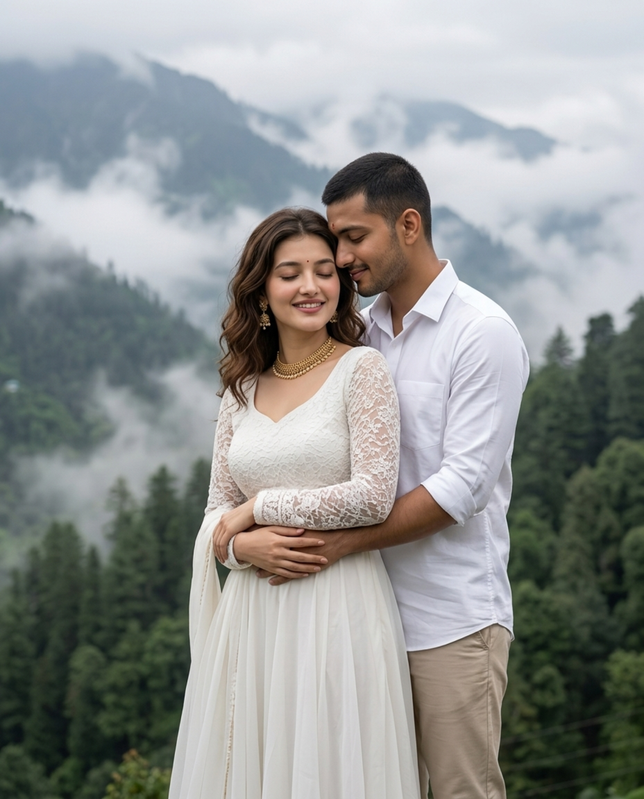
Pose: The couple is standing together in a loving embrace in the mountains. The man stands behind his girlfriend, gently wrapping both arms around her waist. He leans his head close to hers, smiling softly with his eyes closed. The woman stands in front of him with her eyes closed and a beautiful, natural smile, gently resting her hands over his arms. Capture a peaceful, intimate, romantic moment filled with genuine affection.
Outfits: The man wears a clean, elegant white button-up shirt with sleeves rolled up and beige trousers. The woman wears a beautiful white traditional-inspired dress with delicate lace sleeves and a flowing skirt, accessorized with an elegant gold necklace and matching earrings.
Background: A breathtaking misty mountain landscape covered in lush green forests, with soft white clouds and fog drifting between the mountains. Overcast natural light creates a dreamy, peaceful atmosphere.
Photography: Professional Indian pre-wedding photoshoot, cinematic composition, soft diffused natural lighting, realistic skin texture, detailed fabric, natural expressions, shallow depth of field, 85mm portrait lens, beautiful muted colors, premium DSLR photography, photorealistic, high resolution, 4K quality, vertical 4:5 aspect ratio.
Important: Keep both faces as close as possible to the uploaded reference photos. Maintain realistic body proportions, natural hands and fingers, authentic expressions, and a believable romantic embrace. No face swapping errors, no distorted anatomy, no artificial skin, no extra fingers, no text, no watermark.
How to Use This Couple Prompt in ChatGPT
You can use this couple prompt ChatGPT with an image-generation or image-editing feature that supports reference photos.
- Open ChatGPT and start a conversation with an image-capable feature.
- Upload clear reference photos of both people, if supported.
- Copy the romantic couple prompt from this post.
- Paste the prompt and ask ChatGPT to create the image.
- Review the result and request adjustments to the pose, outfits, background, or lighting if needed.
For better results, choose reference photos in which both faces are clearly visible. AI-generated results can vary, so you may need to refine the instructions or try another generation.
Couple Prompt for Gemini AI
This couple prompt for Gemini AI can also be tried with a Gemini feature that supports image generation or photo editing. Upload your reference photos, paste the prompt, and describe any changes you want to make to the final scene.
For example, you can replace the garden with a cozy café, a city street at sunset, a beach, or a softly lit indoor setting. Keep the identity-preservation instructions in the prompt when changing the background or pose.
Gemini AI Couple Photo Prompt Copy Paste
If you are looking for a Gemini AI couple photo prompt copy paste option, the main prompt above is ready to use as a starting point. You do not need to write a long description from scratch.
Simply copy the prompt, upload the reference photos, and customize the scene to match your preferred style. You can change the clothing colors, camera angle, lighting, and background while keeping the overall romantic mood.
More Romantic Couple AI Prompts to Try
1. Romantic Close-Up Couple Portrait
Create a realistic close-up portrait of the same adult couple standing cheek-to-cheek with soft smiles. Use warm natural light, authentic skin texture, subtle background blur, and a cozy romantic atmosphere. Preserve both people's recognizable features and natural expressions. Use a vertical portrait composition with realistic photography details.
2. Couple Sunset Photography
Create a cinematic photograph of the same adult couple walking hand in hand beside a peaceful lake at sunset. Use a warm sky, gentle reflections on the water, natural expressions, and soft golden light. Keep both people recognizable from their reference photos, with realistic clothing, natural body proportions, and a beautiful romantic mood.
3. Cozy Indoor Couple Photo
Create an ultra-realistic indoor portrait of the same adult couple sitting close together near a window. The couple shares a gentle smile in a comfortable, affectionate moment. Use soft window light, warm neutral colors, realistic fabric textures, natural skin details, and a softly blurred background. Keep the scene candid and believable.
4. Cinematic Couple Portrait
Create a cinematic portrait of the same adult couple standing close together on a quiet city street in the evening. Use subtle streetlights, a naturally blurred urban background, realistic shadows, and a tasteful cinematic color grade. Preserve their recognizable facial features and make the final image look like professional lifestyle photography.
Tips for Creating Better Couple AI Photos
- Use clear reference photos: Well-lit photos with visible facial features can help the model understand each person's appearance.
- Describe the pose clearly: Explain where each person stands and how they interact.
- Specify the lighting: Golden-hour light, window light, or soft evening light can produce different moods.
- Keep the scene realistic: Natural expressions and believable backgrounds often look more authentic.
- Customize the outfits: Mention clothing colors and styles to create a coordinated look.
- Check the final image: Review faces, hands, clothing, and reflections for possible generation errors.
Frequently Asked Questions
Can I use a prompt for couple photo in ChatGPT?
Yes. You can try this prompt with a ChatGPT feature that supports image generation or editing. Upload reference photos if supported, paste the prompt, and customize the scene as needed.
Can I use the same couple prompt in Gemini AI?
Yes. You can try the same prompt in Gemini AI if the image feature available to you supports your intended task. Results may differ between tools.
How do I make my AI couple photo look realistic?
Use clear reference photos and describe natural lighting, realistic skin texture, accurate anatomy, believable poses, and a simple background. Avoid relying only on words such as “beautiful” or “8K” without explaining the scene.
Can I create romantic couple photos for Instagram?
Yes. You can customize the prompt for a vertical portrait, sunset photo, close-up, or cinematic couple image. Check the crop and final image before sharing it on social media.
Conclusion
Creating romantic AI couple photos can be simple when you use a detailed prompt. This prompt for couple photo in ChatGPT is a starting point for creating realistic and cinematic portraits with ChatGPT or Gemini AI.
Copy the prompt, use suitable reference photos, and personalize the scene to match your style. Try different poses, outfits, and backgrounds to create a couple portrait that feels special and unique.


Comments